Anderson Steven L, Murray Seth C
Department of Soil and Crop Sciences, Texas A&M University, College Station, TX, United States.
Front Plant Sci. 2020 Sep 30;11:511768. doi: 10.3389/fpls.2020.511768. eCollection 2020.
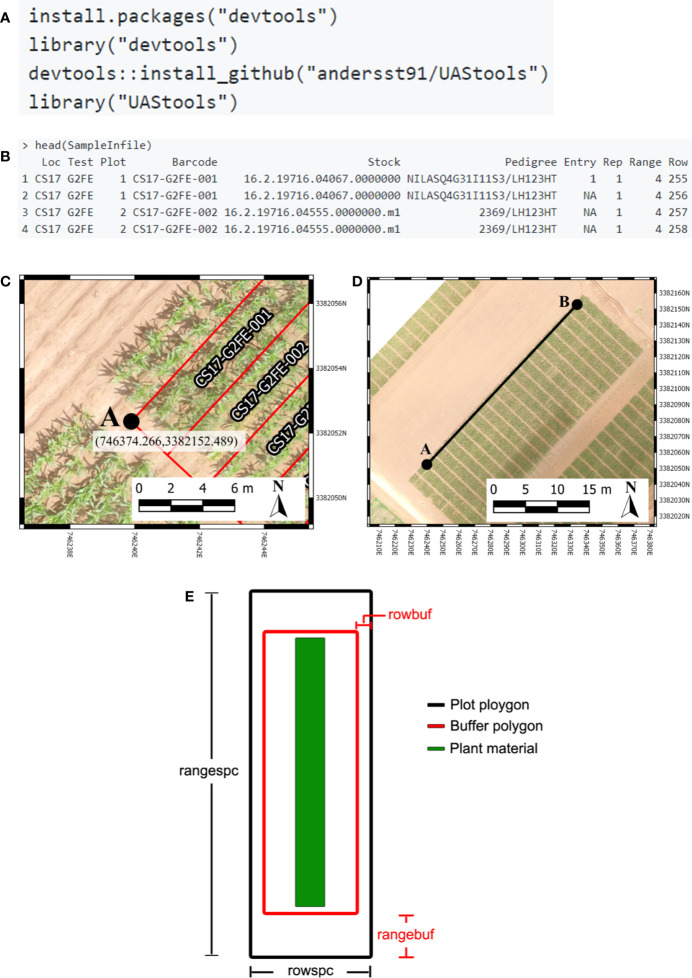
Agricultural researchers are embracing remote sensing tools to phenotype and monitor agriculture crops. Specifically, large quantities of data are now being collected on small plot research studies using Unoccupied Aerial Systems (UAS, aka drones), ground systems, or other technologies but data processing and analysis lags behind. One major contributor to current data processing bottlenecks has been the lack of publicly available software tools tailored towards remote sensing of small plots and usability for researchers inexperienced in remote sensing. To address these needs we created plot shapefile maker (R/UAS::plotshpcreate): an open source R function which rapidly creates ESRI polygon shapefiles to the desired dimensions of individual agriculture research plots areas of interest and associates plot specific information. Plotshpcreate was developed to utilize inputs containing experimental design, field orientation, and plot dimensions for easily creating a multi-polygon shapefile of an entire small plot experiment. Output shapefiles are based on the user inputs geolocation of the research field ensuring accurate overlay of polygons often without manual user adjustment. The output shapefile is useful in GIS software to extract plot level data tracing back to the unique IDs of the experimental plots. Plotshpcreate is available on GitHub (https://github.com/andersst91/UAStools).
农业研究人员正在采用遥感工具来对农作物进行表型分析和监测。具体而言,目前正在使用无人机系统(UAS,即无人机)、地面系统或其他技术在小地块研究中收集大量数据,但数据处理和分析却滞后了。当前数据处理瓶颈的一个主要原因是缺乏专门针对小地块遥感且便于遥感经验不足的研究人员使用的公开可用软件工具。为满足这些需求,我们创建了地块形状文件制作工具(R/UAS::plotshpcreate):一个开源R函数,它能快速创建ESRI多边形形状文件,使其达到各个农业研究地块感兴趣区域的所需尺寸,并关联地块特定信息。开发plotshpcreate是为了利用包含实验设计、田间方位和地块尺寸的输入,以便轻松创建整个小地块实验的多多边形形状文件。输出的形状文件基于用户输入的研究田地理位置,确保多边形的准确叠加,通常无需用户手动调整。输出的形状文件在GIS软件中很有用,可用于提取可追溯到实验地块唯一ID的地块级数据。Plotshpcreate可在GitHub上获取(https://github.com/andersst91/UAStools)。